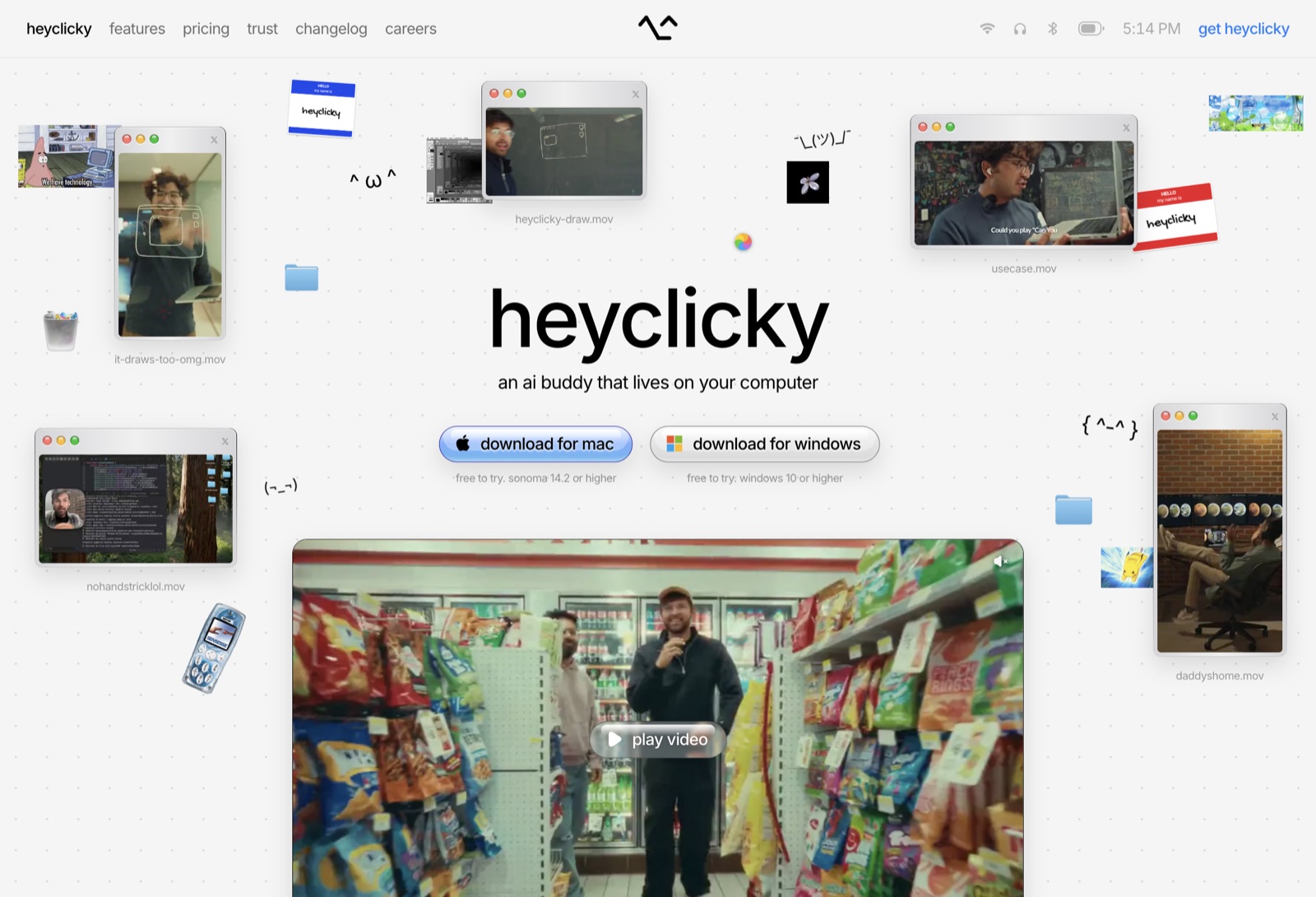
heyclicky.com sells an AI helper that lives on your computer, so the page is a computer: a menubar for a header, a dotted desktop for a hero, Finder folders for a footer. Every surface borrows from Mac OS X Aqua (gloss, pinstripe-grey windows, traffic lights) and every word is lowercase. It works because the costume never stops. Even the testimonials are windows.
Palette and type
One grey page (#f5f5f5), black ink at four strengths, and colour only where Aqua would put it: buttons, tags, the link blue.
Window chrome
Four frames carry almost everything on the page. The brushed window has no real border: a transparent 1px border is painted by a second gradient that fades from black to 10%, so the edge is crisp on top and gone at the bottom.
The aqua family
Buttons are lenses. A vertical gradient, a gloss strip across the top, a white lip at the bottom blended with screen, and a grey rim burned into the fill with color-burn. Pressed, they shrink to 97% in 0.12s; hovered, they drop to 80% opacity.
The hero
A desktop: windows playing clips, name tags, folders, kaomoji and a beach ball, scattered around one headline. Drag a window by its titlebar. Click one, or its green light, and it grows into a lightbox; close it and it shrinks back to where it sat. Hover the beach ball.
The menubar
The header is a macOS menubar: nav on the left, the logo in the middle, status icons and a clock on the right. The icons are real. Hover the wifi or the headphones.
The logo is a face that’s alive on one 7-second clock. It glances left and right, then blinks twice, and each blink squishes the whole mark.
Talking to it
The feature section shows a conversation: a waveform that swells while you talk and greys out when you stop, your words typed into a glossy speech bubble, then the face pops in on a spring and answers.
The manifesto
The founder’s note is typed into a notes window when you reach it. One phrase is inked black on a lemon highlight, which grows letter by letter with the typing.
Liquid glass
The pricing section sits on a sky. The plan toggle is glass that bends the clouds through its rim, the selected plan is a sliding white pill, and switching plans rolls the price digit by digit like an odometer.
Motion on scroll
Every section rises into place as it reaches the screen. Blocks start 22px low at 96.5% size, and the later blocks in a group wait 0.12s and 0.24s.
The testimonials open with a marquee that runs on your scroll instead of a clock, so it stops when you stop. The copy nearest the middle is the one in full black.
The FAQ
White rows on the grey page. An answer eases open to its own height and the plus turns into a cross.
The footer
The wordmark is set in Finder folders, and drops in when the footer is reached. Type your own word.
What to take
Commit to one metaphor and let it reach the boring parts: the header, the testimonials, the FAQ.
Track every size at the same −3%. The type looks designed with no per-size tuning.
Use alpha greys for text, so one colour reads right on both the page and the cards.
Give everything that arrives the same out-curve, and everything pressed the same 97%.
---title: heyclickydescription: A landing page dressed as a 2000s Mac desktop, with aqua buttons, draggable windows and a face that blinks.date: 2026-10-31---[heyclicky.com](https://www.heyclicky.com/yt) sells an AI helper that lives on your computer, so the page *is* a computer: a menubar for a header, a dotted desktop for a hero, Finder folders for a footer. Every surface borrows from Mac OS X Aqua (gloss, pinstripe-grey windows, traffic lights) and every word is lowercase. It works because the costume never stops. Even the testimonials are windows.![[original-hero.jpg]]> [!aside]> The original, October 2026. Everything below is rebuilt from CSS and SVG; none of their pictures or video is used.## Palette and typeOne grey page (`#f5f5f5`), black ink at four strengths, and colour only where Aqua would put it: buttons, tags, the link blue.<island name="hc-palette"></island>> [!aside]> The whole site is Inter at two weights, 400 and 500. Every size tracks at exactly −3% of itself: 88px at −2.64px, 56px at −1.68px, 12px at −0.36px. Body grey is `#00000080` and captions `#0006`, both alpha, so they sit right on white and on the grey.## Window chromeFour frames carry almost everything on the page. The brushed window has no real border: a transparent 1px border is painted by a second gradient that fades from black to 10%, so the edge is crisp on top and gone at the bottom.<island name="hc-windows"></island>> [!aside]> Frame: `linear-gradient(90deg, #d6d5d7, #f0f0f0 50%, #d6d5d7)` on padding-box, `linear-gradient(#000, #0000001a)` on border-box, 8px radius, `drop-shadow(0 10px 12px #0000001f)`, and a 1px inner highlight `inset 0 1px 1px #fffc`. The notes window lays `#feea3d33` over the same frame. Cards draw their fading border as a masked ring (`mask-composite: exclude`).## The aqua familyButtons are lenses. A vertical gradient, a gloss strip across the top, a white lip at the bottom blended with `screen`, and a grey rim burned into the fill with `color-burn`. Pressed, they shrink to 97% in 0.12s; hovered, they drop to 80% opacity.<island name="hc-buttons"></island>> [!aside]> Blue fill: `#edf4ff 0%, #d6e7ff 18%, #a2c7ff 50%, #99cbf8 80%, #a2d2f7 100%`, rim `#221898`. Rim burn: `inset 0 -8px 0 4px #b3b3b3` with `mix-blend-mode: color-burn`. Lip: `inset 0 -15px 2px -12px #ffffff40` with `screen`. Text shadow `0 2px 2px #fffc` presses the label into the glass.## The heroA desktop: windows playing clips, name tags, folders, kaomoji and a beach ball, scattered around one headline. Drag a window by its titlebar. Click one, or its green light, and it grows into a lightbox; close it and it shrinks back to where it sat. Hover the beach ball.<island name="hc-hero"></island>> [!aside]> Each piece enters with `opacity 0 → 1` and `translate 0 8px → 0` over 0.45s, 16ms after the piece before it, starting at 0.11s. The lightbox grows on `cubic-bezier(0.2, 0.7, 0.25, 1)` in 0.36s, the curve the site uses for anything that arrives. The grid is a 1px radial dot every 34px.## The menubarThe header is a macOS menubar: nav on the left, the logo in the middle, status icons and a clock on the right. The icons are real. Hover the wifi or the headphones.<island name="hc-menubar"></island>> [!aside]> The popover pill fades and rises 2px in 0.18s. The equaliser's five bars share one `scaleY(0.35 → 1)` keyframe at five durations (0.62s to 0.94s) and five negative delays, so they never line up.The logo is a face that's alive on one 7-second clock. It glances left and right, then blinks twice, and each blink squishes the whole mark.<island name="hc-face"></island>> [!aside]> The blink swaps two paths, open and shut, with stepped opacity keyframes: shut from 60.6% to 61.5% and again from 65.7% to 66.6% of 7s, about 60ms each. The glance is `skew(±7deg)` while the eyes slide 1px. The squish is `scale(1.011, 0.95)` with an overshooting `cubic-bezier(0.34, 1.75, 0.6, 1)` back. The face here is ours; the timing is theirs.## Talking to itThe feature section shows a conversation: a waveform that swells while you talk and greys out when you stop, your words typed into a glossy speech bubble, then the face pops in on a spring and answers.<island name="hc-voice"></island>> [!aside]> The reply's mark starts at `scale(0.3) rotate(-18deg)` and springs in over 0.5s on `cubic-bezier(0.34, 1.56, 0.64, 1)`; the text follows 6px up on `cubic-bezier(0.22, 1, 0.36, 1)`. The typing caret is 2px wide and blinks with `step-end` at 0.8s.## The manifestoThe founder's note is typed into a notes window when you reach it. One phrase is inked black on a lemon highlight, which grows letter by letter with the typing.<island name="hc-notes"></island>> [!aside]> Highlight: `background #feea3d59` with `box-decoration-break: clone`, so a phrase that wraps gets its padding and radius on every line.## Liquid glassThe pricing section sits on a sky. The plan toggle is glass that bends the clouds through its rim, the selected plan is a sliding white pill, and switching plans rolls the price digit by digit like an odometer.<island name="hc-glass"></island>> [!aside]> The bend is a `backdrop-filter: url(#filter)`: an SVG `feDisplacementMap` fed a picture of the pill whose red and green channels push pixels outward near the edge. Only Chromium supports SVG filters as a backdrop, so the original falls back to `blur(8px) saturate(1.3)` elsewhere, and this copy does too.## Motion on scrollEvery section rises into place as it reaches the screen. Blocks start 22px low at 96.5% size, and the later blocks in a group wait 0.12s and 0.24s.<island name="hc-reveal"></island>> [!aside]> `opacity` over 0.55s, `scale` and `translate` over 0.7s on `cubic-bezier(0.2, 0.7, 0.25, 1)`. Separate `scale` and `translate` properties, not one `transform`, so each can have its own duration.The testimonials open with a marquee that runs on your scroll instead of a clock, so it stops when you stop. The copy nearest the middle is the one in full black.<island name="hc-marquee"></island>> [!aside]> The row is masked to fade at both ends: `linear-gradient(90deg, #0000, #000 14% 86%, #0000)`.## The FAQWhite rows on the grey page. An answer eases open to its own height and the plus turns into a cross.<island name="hc-faq"></island>> [!aside]> The trick is `grid-template-rows: 0fr → 1fr` around a `min-height: 0; overflow: hidden` child. It animates to the content's real height with no `max-height` guess and no JavaScript measuring.## The footerThe wordmark is set in Finder folders, and drops in when the footer is reached. Type your own word.<island name="hc-folders"></island>> [!aside]> The original draws its mark with Rive and reveals it from `scale(0.82)` in 0.62s on `cubic-bezier(0.2, 0.9, 0.25, 1)`. This one rasterises the word on a tiny canvas and puts a folder on every dark pixel.## What to take- Commit to one metaphor and let it reach the boring parts: the header, the testimonials, the FAQ.- Track every size at the same −3%. The type looks designed with no per-size tuning.- Use alpha greys for text, so one colour reads right on both the page and the cards.- Give everything that arrives the same out-curve, and everything pressed the same 97%.